
.png)

Developer Home
Add Real-Time Human Vitals to Any App
Turn any smartphone or camera into a real-time vitals sensor - no hardware, no wearables. Anytime. Anywhere
Try our SmartSpectra™ SDK for free.
SDK Documentation
Develop your first prototype with less than 10 lines of code
.svg)

.svg)
Available Measurements


Hello World
Our SDK is lightweight, fast, and comes with full documentation and sample projects. Pick your platform and start experimenting today.

Fast code to fast results
Four fast steps to "Hello World":
- Chose your platform. - Grab the code that matches to your chosen platform.
- Paste in the code. - Copy and paste into your developer environment.
- Install the SDK - Follow the comments to reference in the Presage special software and to activate your camera.
- Get your API key - Get your API key from our Developer site.
... and Go.
// Check for the latest versions at
 https://github.com/Presage-Security/SmartSpectra/tree/main/android

// Requires adding the SmartSpectra SDK via Gradle. In settings.gradle:
//   dependencyResolutionManagement {
//     repositoriesMode.set(RepositoriesMode.PREFER_SETTINGS)
//     repositories {
//       google()
//       mavenCentral()
//       // Required for MPAndroidChart dependency
//       maven { url "https://jitpack.io" }
//     }
//   }
// Then add the dependency in app/build.gradle:
//   implementation("com.presagetech:smartspectra:1.0.25")

// The SDK handles camera permissions automatically. To customize the
// permission rationale shown to users, add a <string name="camera_permission_hint">...</string>
// in res/values/strings.xml (docs)

import android.os.Bundle
import androidx.appcompat.app.AppCompatActivity
import com.presagetech.smartspectra.SmartSpectraView
import com.presagetech.smartspectra.SmartSpectraSdk

class MainActivity : AppCompatActivity() {
  private lateinit var smartSpectraView: SmartSpectraView

  override fun onCreate(savedInstanceState: Bundle?) {
    super.onCreate(savedInstanceState)
    setContentView(R.layout.activity_main)

    // Set your SmartSpectra API key.
    // You can obtain an API key at: https://physiology.presagetech.com/auth/register
    SmartSpectraSdk.getInstance().setApiKey("YOUR_API_KEY_HERE")

    // Reference the SmartSpectraView from your layout.
    smartSpectraView = findViewById(R.id.smart_spectra_view)
  }
}
/// Add the SmartSpectra package via Swift Package Manager:
 https://github.com/Presage-Security/SmartSpectra/tree/main/swift

/// Add a Camera usage description (NSCameraUsageDescription) to your target's Info.plist.

import SwiftUI
import SmartSpectraSwiftSDK

struct ContentView: View {
  @ObservedObject var sdk = SmartSpectraSwiftSDK.shared

  init() {
    // Set your SmartSpectra API key.
    // You can obtain an API key at: https://physiology.presagetech.com/auth/register
    let apiKey = "YOUR_API_KEY_HERE"
    sdk.setApiKey(apiKey)
  }

  var body: some View {
    SmartSpectraView()
  }
}
// Reference the latest C++ versions at
 https://github.com/Presage-Security/SmartSpectra/tree/main/cpp

// Install the SmartSpectra C++ SDK and dependencies on Ubuntu/Mint.
// This sets up the Presage repository and installs the SDK package (docs):
//   curl -s "https://presage-security.github.io/PPA/KEY.gpg" | gpg --dearmor | sudo tee /etc/apt/trusted.gpg.d/presage-technologies.gpg >/dev/null
//   sudo curl -s --compressed -o /etc/apt/sources.list.d/presage-technologies.list \
//       "https://presage-security.github.io/PPA/presage-technologies.list"
//   sudo apt update
//   sudo apt install libsmartspectra-dev libopencv-dev libglog-dev
//
// Build and run (CMake example):
//   mkdir build && cd build
//   # CMakeLists.txt should call find_package(SmartSpectra REQUIRED) and link against SmartSpectra::Container.
//   cmake .. && make
//   ./hello_vitals YOUR_API_KEY
//
// The code below performs a spot measurement and prints pulse and breathing rate.

#include <smartspectra/container/foreground_container.hpp>
#include <smartspectra/container/settings.hpp>
#include <physiology/modules/messages/metrics.h>
#include <glog/logging.h>
#include <iostream>

using namespace presage::smartspectra;

int main(int argc, char** argv) {
  google::InitGoogleLogging(argv[0]); // required logging setup
  FLAGS_alsologtostderr = true;

  // Set your SmartSpectra API key (register at https://physiology.presagetech.com/auth/register)
  std::string apiKey = "YOUR_API_KEY_HERE";

  // Create settings for a spot measurement using the default camera.
  container::settings::Settings<
      container::settings::OperationMode::Spot,
      container::settings::IntegrationMode::Rest> settings;
  settings.video_source.device_index = 0;         // use default webcam
  settings.integration.api_key = apiKey;          // assign API key
  settings.headless = true;                       // disable built-in GUI (optional)

  // Instantiate the container for CPU + spot mode (foreground).
  auto container = std::make_unique<container::CpuSpotRestForegroundContainer>(settings);

  // Register a callback to print pulse and breathing BPM.
  container->SetOnCoreMetricsOutput([](const presage::physiology::MetricsBuffer& metrics, int64_t) {
    int pulse = static_cast<int>(metrics.pulse().strict().value());
    int breathing = static_cast<int>(metrics.breathing().strict().value());
    std::cout << "Pulse: " << pulse << " BPM, Breathing: " << breathing << " BPM\n";
    return absl::OkStatus();
  });

  // Initialize the camera and start the measurement.
  container->Initialize();
  container->Run();
  return 0;
}
Get a Jump Start with this Fully Integrated Example
This GitHub repo provides an end-to-end example with:
- A fully embedded version of the SDK
- Full connection to the iPhone camera
- Integration points for the UI to access the user sensing data feeds
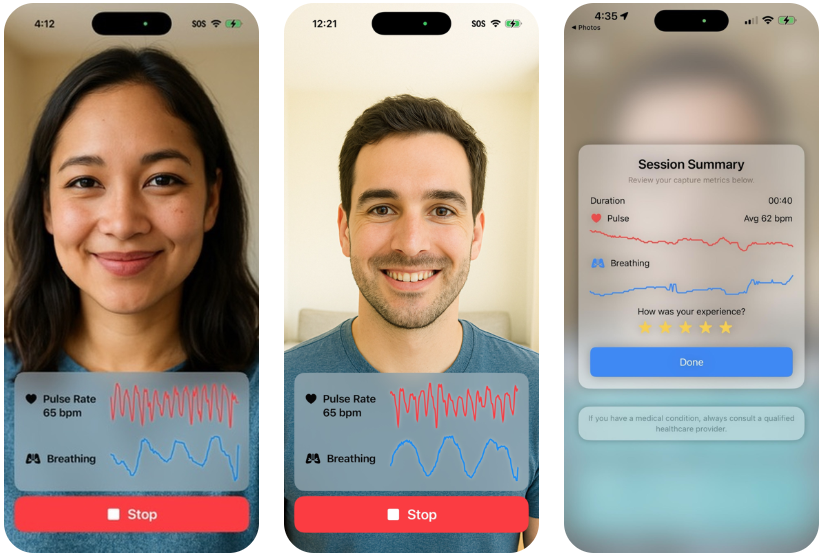
- A simple user interface that can start/stop a session, provide live feedback and flag activity while the session is running, and provide a useful summary at the end.
Want us to host your app?
If you meet our Guidelines, we can host your app on Sixth Sense -- our industry leading hub supporting health experiences of all kinds:
- Hosting - We are already on the App Store and you can be too with the snap of your finger.
- Customized User Experience - Let us match in your logo, your terms, your color scheme and your splash.
- Billing - We can take care of all usage billing and send you the total every week or month.
- User Management Portals - Need to manage your users, change settings and see how they are doing?

Industry applications
From healthcare to gaming, from automotive to wellness — our sensing layer adapts to any environment. Explore how leading industries use it, or spark ideas for your own.

.png)
.svg)

.png)
.png)

.svg)

.svg)

.svg)

FAQs
I want the tech, but I don't have a developer
How do I get involved?
I am a RESEARCHER. Can I use this for my new diagnostic? Sure, we run our own labs. Reach out and let us support you with great, real time tech, so that you can speed your new diagnostic out to help the people of the world.
What physiological signals and features can SmartSpectra measure?
How does Presage protect privacy and handle user data?
What environmental conditions are needed for accurate measurements?
What is SmartSpectra and how does it work?
How accurate is the SmartSpectra SDK?
Which platforms and programming languages does SmartSpectra support?
Is SmartSpectra a medical device or FDA‑approved product?
How do I integrate SmartSpectra into my app?
Trusted by innovators worldwide










Configurations to Make Your Application Sing
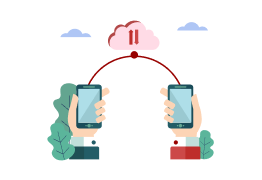
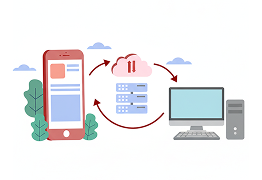
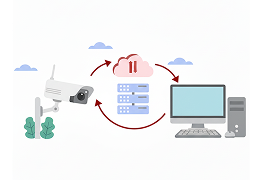
Whether you are creating an application for a single user at a time, connecting people, providing remote support or integrating right into your enterprise systems, Presage has the capabilities and interface options for you.



157M+
Medical-grade measurements that underpin both our technology and our models
98.7%
Clinically validated accuracy of Presage vital signs measurements
3180+
Real time ways to Bring LifeSM to your next-generation digital experiences

Simple, transparent pricing
Flexible plans to fit your needs — from prototypes to enterprise scale.
No hidden fees, no surprises — just clear, predictable plans that give you full access to the power of human sensing. Start small, scale fast, and pay only for what you use.
Business plan
Pay only for what you need
$0.007
per measure*
$200/mo minimum
Enterprise plan
Integrate into your workflows
All Yours
Ready to match how you price
Contact us if you have a need for more Advanced Measures such as Absolute Blood Pressure, Compensatory Reserve and other research-related measures or updates faster than 1Hz.

Advanced Applications
For specialized measures like absolute blood pressure, electrodermal activity (EDA - sweat), shock/trauma/ compensatory reserve and more...